ProgressCrabs
Claude Code mod that adds a live progress band above the prompt, a Crab Tasks pane with a bar per step, and a side-session panel drawn as little crabs. Dracula by default, with ten more themes.
Install
/plugin install progress-crabs --marketplace gkuba/ProgressCrabsFrom the README
A Claude Code mod for long chats: a live progress band above the prompt and a panel of side sessions drawn as little crabs. Dracula by default, with ten more themes.
What it shows
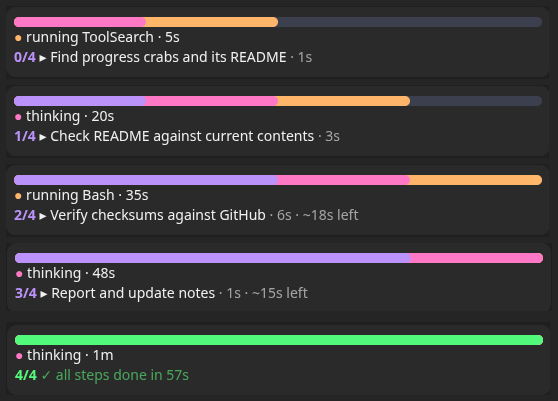
- Progress bar: the chat’s task list as a full-width pill. In Dracula: purple = done, pink = in progress, orange = up next, slate = the rest.
- Working row: what Claude is doing right now and for how long:
thinking · 42s,running Bash · 1m,writing · 2m. Shows in any chat, task list or not. - Steps and time:
done/total, the current step, how long it has run and~Nm leftfrom the finished steps (the latest weigh most; shown once two have finished and their times agree). A finished list flashes once, then turns green with its total time. A turn stopped mid-step marks it⏸ interrupteduntil the next update. In a short or narrow window it folds into one row. - Crab Tasks pane:
details ↗on the band or/progress listopens a Crab Tasks tab with one bar per step. The running step cools like hot metal (orange edge through pink to purple) as it fills against the usual step’s time, pulses when it runs long, and flashes green when it finishes. - Side sessions: each session started from this chat, by title, with its state.
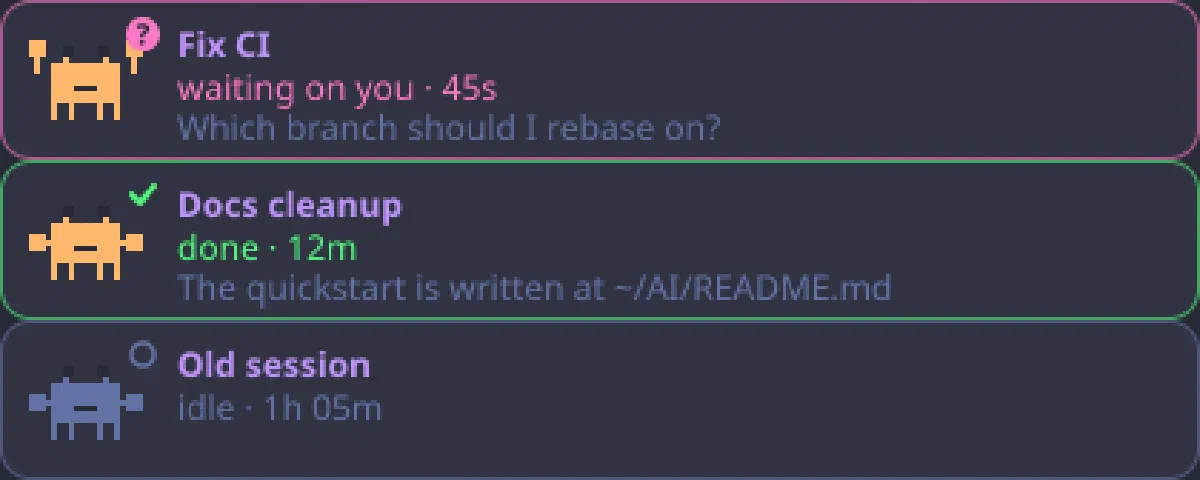
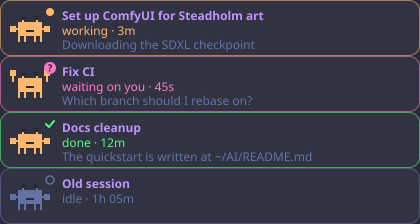
- Crab panel: one card per side session, and in a side session one for the chat that started it (marked
↑when the app’s list makes it certain, read every 10 seconds while any session works, every minute when all are idle). Idle times count from the session’s last activity; archived sessions drop off. Sessions that need you sit at the top. The crab walks while it works, raises its claws with a?when it waits on you, shows a check when done. A toast pops when one finishes a turn or starts waiting;Open ↗switches to it.
Works on the desktop app (drawn as SVG) and in the terminal (block characters). Animation stops under reduced-motion settings. After a restart or resume the task list is rebuilt from the chat’s transcript.
Install
/plugin install progress-crabs --marketplace gkuba/ProgressCrabs
Or in two steps:
/plugin marketplace add gkuba/ProgressCrabs
/plugin install progress-crabs@progress-crabs
Or from a clone:
claude plugin marketplace add ~/Projects/ProgressCrabs
claude plugin install progress-crabs@progress-crabs
Use
/progresshides or shows the band for the session;/progress showand/progress hideset it either way;/progress listopens or closes the Crab Tasks pane;/progress cleardrops a task list left behind (one not updated for 3 turns draws dimmed). Anything else prints the usage./progress theme [name]lists or switches colour themes (see Themes)./crabsshows or hides the side sessions panel (it opens by itself the first time a side session appears; once you close it, it stays closed until/crabs).- The panel reads the app’s session list in the background, but never puts a permission dialog up by itself. If your permission mode would ask, the panel shows an Allow session tools button; press it (or run
/crabs) and answer “always allow” to keep it current. Until then it uses the app’s note. - Turn it off:
claude plugin disable progress-crabs@progress-crabs. Remove it:claude plugin uninstall progress-crabs@progress-crabs.
Themes
dracula (default), tokyo-night, nord, github, github-light, gruvbox, one-dark, catppuccin-latte, catppuccin-frappe, catppuccin-macchiato, catppuccin-mocha.
/progress themelists them, marks the current one and opens a Themes panel with each theme’s colours; click one to switch./progress theme <name>switches straight away. The choice is saved and carries into new chats./progress theme defaultgoes back to the theme in your settings.
Settings
Set a Theme and four optional hex colours laid over it, Done, Current, Next and Crab (leave one blank to keep the theme’s colour), in /config, on the install screen, or with:
/plugin configure progress-crabs@progress-crabs
From a shell, claude plugin configure progress-crabs@progress-crabs shows what is set, and this sets values:
echo '{"theme":"nord","done_color":"#88c0d0","crab_color":"#d08770"}' | claude plugin configure progress-crabs@progress-crabs --values-stdin
They are stored in ~/.claude/settings.json under pluginConfigs.
A theme picked with /progress theme wins over the settings’ theme until you change the settings’ theme, which then takes over; the hex colours apply on top of either.
Edit or add a theme
The palettes are in plugins/progress-crabs/hooks/themes.ts, one entry per theme; the comment at the top says which part of the band each colour paints. In a clone installed as a local marketplace (see Install), edit that file or add an entry, then run /reload-plugins or start a new chat. A new entry shows up in /progress theme at once; add its name to the theme options in plugins/progress-crabs/.claude-plugin/plugin.json to put it in the settings picker too.
Notes
The task list and side sessions come from the Claude desktop app’s task-list and linked-session tools; in a plain terminal session the band shows the working row only.
Develop
The mod lives in plugins/progress-crabs. Check and test it with:
claude plugin validate plugins/progress-crabs
claude plugin test plugins/progress-crabs
A clone installed as a local marketplace is read live: edits load in new sessions.
Credits
The crab animation approach (a CSS-animated sprite inside an SVG) follows savvy-progress (MIT). The sprite and code here are this project’s own.
License
MIT, see LICENSE.